
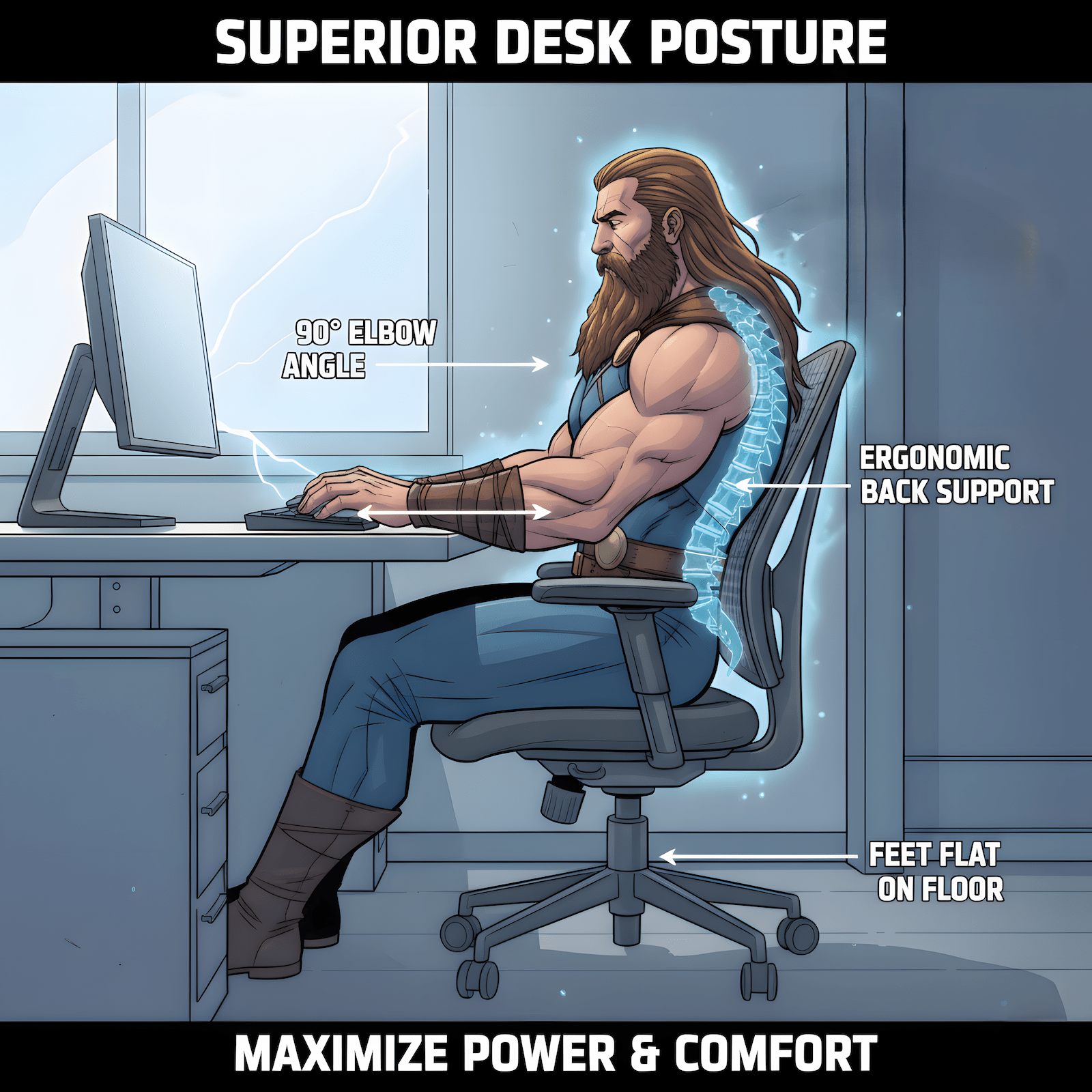
You’re asking the wrong question. It’s not “can I use a gaming desk for work,” it’s “does this surface, at this height, with this layout, support 6-hour cognitive load without making me want to quit by 2pm?” The answer has nothing to do with whether it has RGB strips or cable raceways marketed to gamers.

I Used to Dream About Battlestation Setups (Until They Started Breaking Me)
I get it. I used to scroll r/battlestations and dream about the full gamer setup. RGB everything. “Gamer OC” GPU. Gaming chair with the racing stripes. The whole aesthetic. The marketing works. You see “gamer” on the label and assume it’s optimized for performance, like a GPU with “Gamer OC” branding that costs more than the regular overclocked version, but it’s the gamer one, so it must be better, right?
Except it’s not. It’s the same chip with RGB lights and a higher price tag. Here’s what nobody tells you: even if you buy the premium “gamer OC” GPU with all the RGB, if your CPU can’t handle it, or your motherboard bottlenecks it, or your power supply can’t draw that kind of power, it’s useless. The system has to work together. The label doesn’t matter if the stack is broken.
The same thing happened with my desk setup. I had the gaming chair. The RGB fans. The “gaming” peripherals. And by the time I logged out each day, I was exhausted. Not from the work, from fighting the setup. Headaches. Lower back pain. Shoulders locked up. I stretched every hour. I stood up and moved around. Didn’t matter. The chair wasn’t designed for 6-hour sessions, it was designed to look like a racing seat.
Then I sat in my friend’s old ergonomic office chair. Not premium. Not branded. Just a standard office chair designed for long-duration sitting. The difference was instant. That’s when it clicked: I wasn’t tired from working, I was tired from fighting gear that was designed for aesthetics, not function.
I stripped it down. Removed the RGB fans (there’s a meme that RGB adds FPS to your gaming, it doesn’t, it just adds heat and distraction, but still a funny meme). Replaced them with normal fans. Kept the bare essentials. Optimized the system instead of decorating it.
Here’s the kicker: nobody even sees my setup. I’m not streaming. I’m not posting to r/battlestations. The only person sitting at this desk is me. I was optimizing for a screenshot I’d never take, for an audience that didn’t exist.
Now my setup is boring: ergonomic chair (supports my back, not my aesthetic), standing desk (not because it’s trendy, because it holds my monitor arms), two monitors plus laptop arm (my actual I/O requirements), zero RGB. It’s not impressive to look at. It’s impressive to use. And I don’t end the day with a headache anymore.
Your desk is the same trap. “Gaming desk” is a marketing label, not a performance spec.
Why “Gaming Desk” Is Marketing, Not Engineering
A gaming desk is an office desk with better cable management and a matte black finish. That’s it. The “features” that separate them are addon theater: cup holders (you have a table), headphone hooks (you have a wall), RGB lighting (you have, why do you need this?), “gaming-grade” materials (it’s MDF with a coating).
None of this changes whether the desk works for your body and your workflow. What actually matters: surface area (can it hold your actual I/O, laptop plus monitor, triple screens, whatever it is?), stability (does it wobble when you type or shift weight?), height compatibility (does it pair with your chair without wrecking your shoulders?).
If you want the full framework behind this, keep reading, the Control Room Test below is exactly that. You’re building for mission clarity, not aesthetic approval.
The Real Question: Does Your Chair-Desk Stack Actually Work?
Most people buy desks and chairs separately. Then they sit down and realize their elbows are at the wrong angle, their neck is craned forward, and their shoulders are tensed for 8 hours straight. By the time they notice, they’ve already convinced themselves it’s fine. It’s not.
The elbow test: sit in your chair. Adjust it to where your feet are flat and your thighs are parallel to the floor. Now put your hands on the desk like you’re typing. Your elbows should be at 90 to 100 degrees. Not reaching up. Not hanging low. Neutral. If they’re not, your desk-chair stack is broken, and it’s draining energy you don’t even realize you’re losing.
Where gaming desks actually cause problems: gaming chairs (bucket seats, fixed geometry) plus tall desks equals shoulder death. Standing desks, even adjustable ones, plus gaming chairs with limited height range equals bad ergonomic compatibility. Cheap gaming desks (thin surface, poor stability) plus monitor arms equals wobble city.
Where they work: adjustable office chairs plus gaming desks with proper height, fine, if the dimensions align. Hybrid work-slash-game setups where you’re already optimizing for multi-monitor and peripheral density.
But notice: it’s not because it’s a gaming desk. It’s because the physical specs match your body and your I/O requirements.
Why I Ditched Gaming Chairs (And Why It Matters for Your Desk Choice)

Here’s something most desk guides won’t tell you: your chair dictates what desk height actually works.
I used to run a gaming chair. Looked sick. Felt premium for about 20 minutes. Then reality hit: bucket seats are designed to keep you locked in place. Great for racing. Terrible for 6-hour work sessions where you need to shift, lean, and adjust your posture naturally. Yeah, some gaming chairs recline now. Some let you adjust the bolsters. Some even have memory foam cushions and premium upholstery. Doesn’t matter. The fundamental curve is still wrong. The bucket geometry forces your spine into a fixed position that’s designed for aggressive forward lean and lateral support during high-G turns, not for typing, reading, or sustaining focus.
Here’s the test that broke it for me: I can’t last 5 minutes in a bucket seat while driving, but I can road trip for hours in a standard OEM car seat. Why would my desk chair be different?
I tested premium gaming chairs, the kind that cost $400+ and look like they belong in an esports tournament. Then I sat in an old executive chair at a friend’s place. The difference was immediate. Not because of the brand. Not because of the price. Because of how the chair was designed from the ground up. Gaming chairs are built to look like racing seats. Office chairs are built to support long-duration sitting. It’s not a quality issue, it’s a design philosophy issue.
If you’re pairing a gaming desk with a gaming chair, you’re stacking two marketing categories instead of testing the physical system. It might work, but only by accident, not by design. I switched to a mesh ergonomic chair with full adjustability. My desk didn’t change. But suddenly the stack worked because the chair could adapt to the desk, instead of forcing me into a fixed position.
If you want the full breakdown on why gaming chairs fail at long-duration work and what actually holds up, our comparison of gaming chairs vs office chairs vs ergonomic options walks through it in full. But the short version: bucket seats are a trap.
When a “Gaming Desk” Actually Helps Work (And When It Doesn’t)
A gaming desk makes sense if you already have gaming peripherals. Multi-monitor mounts, mechanical keyboards, USB hubs, external DACs, if your I/O is dense, gaming desks often come pre-configured with routing and space designed for this. You’re not paying for the gaming label, you’re paying for a layout that matches your gear.
It also makes sense if you need built-in cable management. Some gaming desks come with grommets, raceways, and under-desk trays. If you were going to buy these separately anyway, these are the exact add-ons worth adding, you might as well get them integrated. Same logic if you’re hybrid work-slash-gaming and don’t want two setups: one desk, one chair, one monitor configuration that handles both. Gaming desks are designed for this crossover because that’s the actual market, the people who refuse to have a “work desk” and a “gaming desk” in the same room. And if a black matte finish and clean lines make you feel less like you’re sitting in a cubicle, that’s valid. Your environment affects your mental state. Just don’t confuse vibes with function.
A gaming desk does NOT help if your workflow is minimal. Laptop plus external keyboard plus single monitor? You don’t need a 60-inch gaming surface. You need a small, stable desk and better posture. Overbuying creates clutter, and clutter kills focus. Clean signal, clean mind, the same logic applies here.
It also doesn’t help if you’re chasing features you won’t use. If you’re buying a desk because it has a cupholder and a controller stand, but you drink from a water bottle and don’t own a console, you’re paying for marketing. Strip it down. What do you actually need? And it doesn’t help if you haven’t measured your chair’s height range. Doesn’t matter what desk you buy if it doesn’t pair with your chair. Test the stack first, or you’ll be returning furniture in two weeks when your neck starts screaming.
What to Check Before You Buy ANY Desk for Work
Forget categories. Test the system.
1. Measure your chair’s height range first. Most office chairs adjust between 16 and 21 inches from the floor to the seat. Gaming chairs are often 18 to 22 inches because of thicker padding and bucket seat design. Know your chair’s range before you pick a desk height. Standard desk height is 28 to 30 inches. If your chair bottoms out at 18 inches and the desk is 30 inches, your elbows are reaching up. That’s shoulder strain.
2. Test surface stability. Push down on the corners. Lean on it. Type aggressively. If it wobbles, it’s going to break your focus every time you shift weight. Stability beats size.
3. Calculate monitor arm and desk thickness compatibility. Most monitor arms clamp to desks between 0.4 and 3.5 inches thick. Gaming desks with “reinforced edges” are sometimes too thick for standard clamps. Check specs before you buy, or you’ll be drilling holes. Our monitor arm picks list the clamp range for each one, worth checking against your desk before you commit to either.
4. Forget the aesthetic category, test the physical stack. Sit in your chair. Put your hands on the desk. Check the elbow angle. Can you sit here for 4 hours without your shoulders tensing? If no, the desk doesn’t work. Doesn’t matter what it’s called.
If you need a comparison of desk types based on actual layout and use case, our gaming desk vs office desk vs standing desk breakdown covers it directly. But now you know the framework to evaluate them: function first, category never.

The Control Room Test
Your desk isn’t a gaming desk or a work desk. It’s a launchpad or an anchor. Here’s the test:
Can you maintain neutral posture for 4+ hours? If your neck is craning, your shoulders are hunched, or your wrists are angled, the desk is wrong. Doesn’t matter how many LEDs it has.
Does the surface support your actual workflow? Laptop plus monitor? Triple screens? Drawing tablet plus keyboard? If your gear doesn’t fit without overlap or overhang, the desk is too small. If you have 3 feet of empty space you never use, it’s too big.
Can you route cables without them becoming mental noise? Messy cables mean messy focus. If your desk doesn’t let you route power, data, and peripherals cleanly, you’re fighting clutter every day. Cable management is a cognitive fix, not just an aesthetic one.
If you pass all three tests, it doesn’t matter what the desk is marketed as. It works. If you fail even one, the desk is sabotaging you, and you’ll blame yourself for lack of focus instead of blaming the broken stack you’re sitting at.
Stop Buying by Category. Start Building for Signal.
You don’t need permission to use a gaming desk for work. You need to stop thinking in categories and start thinking in systems. The desk is one input in a feedback loop that includes your chair (height, adjustability, support), your monitors (placement, distance, angle), your peripherals (keyboard, mouse, external gear), your cables (routed or chaotic), your lighting (focused or fatiguing).
Optimize the loop. Not the label. Your workspace isn’t a gaming setup or a work setup. It’s a control room. Build it like your execution depends on it, because it does.