Most people click “Apply Now” with zero idea what actually makes or breaks remote work success. The job posting won’t tell you, but this will.
You’re scrolling through work-from-home job listings right now. Remote customer service. Virtual assistant roles. Online data entry. They all promise flexibility, no commute, work in your pajamas.
What they don’t tell you: 60% of new remote workers fail within 90 days.
Not because they can’t do the work. Because they have no system to survive the work.
The job posting lists requirements like “reliable internet” and “quiet workspace.” That’s not preparation that’s a checklist for failure. Here’s what actually determines whether you’ll still have that remote job in three months.

The Job Posting Lies By Omission
Every work-from-home job listing follows the same template:
Requirements:
- High school diploma or equivalent
- Reliable internet connection
- Quiet home office space
- Strong communication skills
- Self-motivated and organized
Translation: We expect you to figure out remote work on your own. Most of you will fail quietly.
Here’s what they actually mean:
- “Reliable internet” = Your ISP’s “best effort” service isn’t good enough when you’re on back-to-back video calls
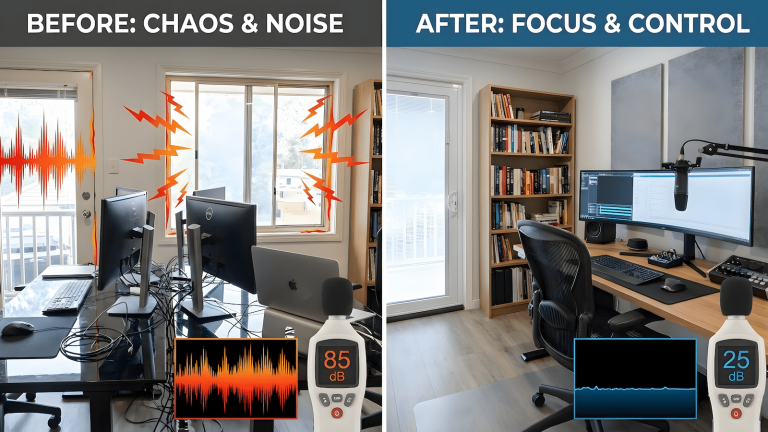
- “Quiet workspace” = You need a door that locks, noise isolation, and a backup plan for when construction starts next door
- “Self-motivated” = You need daily discipline systems because no one’s watching you
- “Strong communication skills” = You need async protocols, response time boundaries, and status update rituals
See the gap? The job listing gives you nouns. Reality demands verbs, systems, routines, protocols.
What Different Work-From-Home Jobs Actually Require
Not all remote work is created equal. Each type has different infrastructure demands that will make or break you.
Remote Customer Service / Support Roles
What the listing says: “Answer customer inquiries via phone, email, and chat.”
What you actually need:
Hardware:
- Wired internet connection (not WiFi—packet loss kills calls)
- Backup internet option (mobile hotspot, secondary ISP)
- USB headset with noise cancellation (not earbuds)
- Backup headset (when one dies mid-shift)
- Dedicated power strip with surge protection
Environment:
- Door that locks (family/roommates will interrupt)
- Background noise below 40dB during work hours
- Backup location plan (coffee shop, library, coworking space)
Philippines Reality Check: If you’re working from home in the Philippines and targeting global clients, your environment challenges are different and harder.
Property lines are tight. Your neighbor’s videoke session doesn’t end until 3 AM. Construction starts at 6 AM. Tricycles, jeepneys, and roosters don’t respect your meeting schedule.
Here’s what you actually need:
- Noise-cancelling headset (not optional—Bose, Sony, or Jabra with active noise cancellation)
- Basic soundproofing: Weather stripping on doors, heavy curtains, foam panels on walls facing neighbors
- White noise machine or app to mask outdoor sounds during calls
- Backup recording location for critical client calls (friend’s quieter house, coworking space, late-night shift when neighbors sleep)
Test this: Record yourself on a video call during peak noise hours (5-7 PM). If you can hear tricycles, dogs, or videoke in the playback, your clients definitely can. Fix it before you apply.
Discipline Systems:
- Bathroom/break schedule that matches your shift pattern
- Energy management routine (you can’t “power through” 8 hours of angry customers)
- Stress reset protocol (what you do between difficult calls)
Why most fail: They think good customer service skills transfer. They don’t account for the mental load of being “on” for 8 straight hours with zero human buffer.
Remote IT / Technical Support
What the listing says: “Troubleshoot technical issues, maintain systems, support remote users.”
What you actually need:
Hardware:
- Dual monitors minimum (triple is better)
- Mechanical keyboard (membrane keyboards slow you down)
- High-DPI mouse (precision matters)
- Cable management system (you’ll have 6+ cables)
- UPS backup power supply (power blips kill productivity)
Environment:
- Ergonomic chair rated for 8+ hour use
- Desk height that prevents wrist strain
- Blue light filtering (you’re staring at screens all day)
- Room temperature control (overheating kills focus)
Philippines Graveyard Shift Reality: If you’re working US hours from the Philippines, you’re working 9 PM to 6 AM. That means sleeping during the day when your neighborhood is loudest.
You need sleep infrastructure as much as work infrastructure. Your body won’t adapt to graveyard shifts if you’re fighting daytime heat, construction noise, and videoke sessions bleeding through thin walls. Sleep debt stacks like compound interest, every hour of interrupted daytime sleep costs you more than just rest. It costs focus, reaction time, and stress tolerance.
Here’s what works:
- Bedroom soundproofing: Same treatment as your work room use weather stripping, heavy blackout curtains (double duty: blocks light AND sound), foam panels if needed
- Bedroom insulation: Philippine heat during daytime sleep is brutal. Invest in AC or at minimum, proper ventilation + blackout curtains to keep the room cool
- Sleep discipline: Blackout masks, white noise, strict sleep schedule (your body won’t adjust if you break the pattern on weekends). Night-damaged tech workers need tactical protocols, not just “better sleep hygiene.”
- Family/household training: Everyone needs to understand 10 AM is your 2 AM. Quiet hours during your sleep time are non-negotiable.
Most Philippines-based remote workers underestimate the sleep disruption. You can have perfect work discipline but if you’re sleep-deprived because of daytime noise and heat, you’ll burn out by month 2.
Test this: Try sleeping 9 AM to 5 PM for a full week while still living your normal life. If you can’t maintain it, you’re not ready for graveyard shift remote work. Fix your sleep environment first.
Discipline Systems:
- Pomodoro breaks with eye exercises (screen fatigue is real)
- Documentation-as-you-go protocol (memory fails under ticket volume)
- Context-switching recovery routine (jumping between tickets destroys flow)
Why most fail: They optimize for technical skills but ignore the physical and cognitive load. Your chair isn’t decor, it’s load-bearing infrastructure that determines whether your spine survives. Burnout hits at month 2.
Freelance / Creative / Async Roles
What the listing says: “Flexible hours, work at your own pace, deliver results.”
What you actually need:
Hardware:
- Whatever your specialty requires (design, writing, coding, etc.)
- BUT: Professional-grade, not consumer-grade
- Backup everything (external drives, cloud sync, redundant systems)
Environment:
- Time-blocking system (freedom without structure is chaos)
- Deep work space separate from shallow work space
- Physical separation between “work” and “life” zones
Discipline Systems:
- Daily startup routine (your brain needs work mode triggers)
- Output tracking (you’re paid for results, not hours)
- Client communication cadence (async ≠ whenever you feel like it)
- Shutdown ritual (or you’ll work until 2 AM every night)
Why most fail: They confuse “flexible hours” with “no structure.” Freedom becomes paralysis. Deadlines become panic sprints.
The Pre-Application System Audit
Before you click “Apply Now” on another remote job, run this audit. Be honest.
Infrastructure Reality Check
Internet:
- Download speed: 50+ Mbps minimum
- Upload speed: 10+ Mbps minimum (critical for video calls)
- Tested during peak hours (not at 3 AM when it’s fast)
- Backup internet option identified and tested
- Router stable under load, if it’s 5+ years old but handles your workflow without dropping packets, it’s fine. Age doesn’t matter if performance is solid.
Hardware:
- Computer meets job requirements PLUS 30% overhead for multitasking
- Specs match your actual workload (not age but an optimized 8-year-old PC beats a new budget laptop)
- You’ve tested it under load: multiple browser tabs, video calls, job-specific tools running simultaneously
- No thermal throttling during 8-hour work sessions
- Webcam doesn’t make you look like a hostage video
- Audio setup tested with background noise present
Hardware Reality Check:
Don’t fall for “you need new gear” advice. Age is irrelevant but optimization and load-matching matter.
- An 8-year-old mid-spec PC optimized for your use case (upgraded RAM, SSD, thermal paste refreshed) will outlast a brand-new budget laptop
- A 5-year-old router that handles your peak household load without dropping packets doesn’t need replacing
- A 10-year-old desktop optimized for graphic design or video editing at 4K beats a 2-year-old consumer laptop every time
The gaming PC advantage:
Here’s the counter-intuitive play: buy a mid-spec gaming PC, not a “work laptop.”
Why? Gaming PCs are engineered for sustained load. If it can handle 10-12 hours of gaming without thermal throttling or crashes, it’ll handle remote work like a tank.
I bought a mid-spec gaming PC pre-pandemic. Still running. Never turns off. Handles my games, my work, multiple screens, coding, QA testing, everything. Why? Because I matched the hardware to my actual use case: gaming + workstation hybrid.
Two traps to avoid:
- The newest specs trap: You don’t need to upgrade every year. Marketing wants you to believe that. A well-maintained mid-spec gaming PC from 5+ years ago still outperforms “modern” budget work laptops. Stability under load > latest generation specs.
- The cheapest work PC trap: Buying the cheapest laptop “for work” is false economy. It’ll throttle, overheat, and die under sustained remote work load. You’ll replace it in 2 years and spend more than if you’d bought properly the first time.
What actually matters:
- Does it run your job’s tools without lag?
- Can it handle video calls + browser tabs + work apps simultaneously?
- Does it survive 8-hour sessions without overheating or crashing?
- Can you run it for days straight without performance degradation?
If yes, you’re ready. If no, don’t buy new—optimize what you have first: more RAM, SSD upgrade, better cooling, wired ethernet connection, thermal paste refresh.
Buying new gear when your current setup just needs optimization is how you waste money without fixing the actual problem.
Workspace:
- Door that closes (not optional)
- Natural light or full-spectrum lighting
- Climate control that works
- Electrical outlets don’t share circuits with high-draw appliances
- Noise level acceptable during work hours
- Philippines-specific: Tested during videoke hours, construction hours, and traffic peak times
- Philippines-specific: Soundproofing installed (at minimum: weather stripping, heavy curtains, foam panels)
- Graveyard shift workers: Bedroom soundproofed and insulated for daytime sleep
Discipline Systems Reality Check
Daily Routine:
- I have a consistent wake time (within 30 minutes)
- I have a morning routine that signals “work mode”
- I know my peak energy hours
- I have a shutdown routine that signals “work done”
Communication:
- I can respond to messages within 2 hours during work hours
- I have a system for tracking conversations across platforms
- I know how to write clear, async-friendly updates
- I’ve set boundaries with family/roommates about interruptions
Mental Management:
- I have a stress management protocol that actually works
- I know my burnout warning signs
- I have a plan for when motivation tanks
- I’ve built breaks into my day (not just when I’m desperate)
- Reality check: My routine doesn’t collapse when I miss a day, it’s built for survival, not perfection
Score yourself honestly:
- 12-15 checked: You’re ready. Apply with confidence.
- 8-11 checked: You’ll survive but struggle. Fix the gaps first.
- 0-7 checked: You’re not ready. Build the system, then apply.
The 30-Day Pre-Application Prep System
If you scored low, here’s your build-out timeline.
Week 1: Infrastructure
- Test your internet during work hours for 5 consecutive days
- Identify and fix any hardware gaps (chair, desk, monitor, headset)
- Set up your workspace with the door-closes test
- Run a full-day work simulation (8 hours of focus-demanding tasks)
- Philippines-specific: Test your setup during peak noise hours (5-7 PM, videoke sessions, early morning construction)
- Philippines-specific: Record a test video call during noise conditions—if you can hear it, fix it
- Graveyard shift prep: Test daytime sleep for 3 consecutive days (9 AM – 5 PM) and identify what breaks your sleep
Week 2: Discipline Foundations
- Establish wake time and morning routine
- Time-block your day (even if unemployed—structure builds habit)
- Practice the Pomodoro technique for 8-hour stretches
- Identify your energy peaks and valleys
- Critical: Build a mental operating system that doesn’t crash under load, discipline isn’t willpower, it’s configuration
Week 3: Communication Protocols
- Set up async communication tools (Slack, email, project management)
- Practice writing status updates daily (build the muscle)
- Create response time boundaries (and stick to them)
- Test video call setup with background noise present
Week 4: Mental Systems
- Build your stress reset protocol (test it under load)
- Create your shutdown ritual (practice it daily)
- Identify your burnout early warning signs
- Prepare your backup plans (bad day protocols, sick day coverage)
By week 4, you’re not just “ready to apply”—you’re ready to succeed after you’re hired.
What Companies Actually Measure (And Won’t Tell You)
Remote companies track more than you think. Here’s what determines if you survive probation:
Response Time Metrics:
- Average time to first response
- Response time during core hours
- After-hours response patterns (they notice if you’re always working)
Output Consistency:
- Daily/weekly delivery cadence
- Quality variance over time
- Deadline hit rate
Invisible Score:
- Do you make your manager’s job easier or harder?
- Can they trust you without constant check-ins?
- Do you solve problems or create them?
Remote work discipline isn’t about working harder, it’s about visible, consistent delivery patterns. Build your systems around these metrics, not the job description.
Red Flags in Work-From-Home Job Listings
While you’re applying, watch for these warning signs:
🚩 “Must be available 24/7” → No boundaries = burnout factory
🚩 “We’re a family” → Code for “we’ll guilt you into overwork”
🚩 “Fast-paced environment” → Chaos masquerading as urgency
🚩 “Flexible hours” + “Must respond immediately” → Contradiction = toxic culture
🚩 No async communication policy mentioned → They expect real-time everything
🚩 “Unlimited PTO” → Often means no one takes time off
Remote work is about systems, not heroics. If the job listing glorifies chaos, run.
The Truth About “Work From Home Jobs Near Me”
You’re searching for jobs “near you” because it feels safer. Local jobs, local employers, maybe even local coworkers.
Here’s the reality: Geography is now your competitive disadvantage.
If you’re limiting yourself to local remote jobs, you’re competing with your entire region for the same handful of positions. Meanwhile, someone in the Philippines is applying for US-based remote jobs at $50/hour while you’re fighting for $15/hour local positions.
The Philippines Advantage (If You Build The System)
If you’re reading this from the Philippines, you have a geographic arbitrage opportunity that most people waste.
Salary disclaimer: These figures are based on 2025 market research from multiple Philippines-specific sources (DOLE, PayScale, NodeFlair, Glassdoor Philippines) and represent ranges not guarantees. Your actual salary depends on skills, experience, company size, and how you position yourself in the market.
The reality check—Philippines local market vs. global remote work:
Philippines Local Employment (Traditional Office/BPO):
- Minimum wage (NCR, 2025): ₱695/day (~₱15,200-18,200/month for 22-26 working days)
- Entry-level IT/QA: ₱34,000-45,000/month (~₱1,550-2,050/day)
- Mid-level IT/QA: ₱58,000-75,000/month (~₱2,640-3,400/day)
- Senior specialists (dev, QA, DevOps): ₱80,000-125,000+/month (~₱3,600-5,700+/day)
- Mid-management: ₱60,000-100,000+/month depending on sector and company size
BPO/Agency Remote Work (What Most Philippines Workers Actually Get):
- Entry-level VA/customer service: $3-5/hour (~₱170-280/hour or ₱25,000-44,000/month for full-time)
- Experienced/specialized VAs: $7-12/hour (~₱395-680/hour or ₱55,000-95,000/month)
- You work through an agency, they take overhead (often 30-50%), you get what’s left
Freelance Marketplace Rates (Upwork, Fiverr, Freelancer.com):
- Commodity pricing: $2-5/hour for generalist work
- Race-to-the-bottom pricing competing with global workers
- No benefits, no stability, constant client hunting
- This is the trap most Philippines freelancers fall into
Direct US Remote Jobs (The Target Most Don’t Reach):
- US remote customer service: $15-23/hour (~₱850-1,300/hour or ₱132,000-202,000/month) for entry to mid-level
- US remote IT/technical support: $18-35/hour (~₱1,000-1,980/hour or ₱158,000-308,000/month) for general support
- US remote specialized roles (dev, QA, DevOps): $30-60+/hour (~₱1,700-3,400+/hour or ₱264,000-528,000+/month)
- Direct employment with US companies—no agency middleman
- Benefits, stability, consistent pay
Comparison baseline: Philippines minimum wage (NCR): ₱695/day (~₱15,200/month)
The gap nobody talks about:
Most Philippines workers end up in local employment (₱15,000-75,000/month) or BPO work ($3-12/hour) because they don’t build the system to compete for direct US remote jobs ($15-60+/hour).
The infrastructure investment matters:
- Quiet room with soundproofing = you can take client calls without videoke in the background
- Graveyard shift sleep setup = you can work US hours without burning out in 60 days
- Professional hardware = you look and sound like a competent remote worker, not someone struggling with bad internet
But here’s the catch: You’re competing with remote workers worldwide who already built their systems. They have quiet rooms, reliable internet, professional setups, and discipline routines that work across time zones.
If you’re applying to global remote jobs with videoke in the background, intermittent internet, and no graveyard shift sleep discipline, you’ll get filtered into local employment or BPO rates, not direct US hiring.
The freelancing trap: Don’t confuse “freelance work” with actual opportunity. Most Philippines-based freelancers are grinding 60+ hours at $2-5/hour, that’s not freedom, that’s structured poverty. A stable remote job with benefits often beats freelancing chaos.
The unlock: Stop searching “near me.” Start searching globally and building systems that work across time zones. The infrastructure investment (soundproofing, better internet, graveyard shift sleep setup) pays for itself in 2-4 weeks if you land direct US remote work instead of settling for local or BPO rates.
That’s a different article. But understand this: the best work-from-home opportunities aren’t in your area code. They’re in time zones where your daytime is their midnight—and they’re willing to pay premium rates for competent remote workers who can deliver without excuses.
What To Do Right Now
You have two paths:
Path 1: Apply Now, Learn Hard
- Click “Apply” on jobs you’re interested in
- Learn remote work systems through trial by fire
- Hope you survive the first 90 days
- 60% chance you’ll be back to job searching in 3 months
Path 2: Build Systems First, Apply Strong
- Spend 30 days building your remote work infrastructure
- Run the pre-application audit until you score 12+
- Apply to jobs with confidence that you can actually deliver
- Dramatically increase your 90-day survival rate
Most people choose Path 1. Then they search “why did I get fired from my remote job” at month 3.
You’re reading this because you’re considering Path 2.
The System Is The Job Security
Remote work isn’t about finding the perfect job listing. It’s about building the system that makes you succeed in ANY remote job.
The discipline to show up daily.
The infrastructure to deliver consistently.
The communication protocols that build trust.
The mental management that prevents burnout.
Build that system first. Then every “Apply Now” button becomes less risky.
The job posting won’t tell you this. They assume you already know.
Now you do.
Next Steps:
- Run the Pre-Application System Audit (be honest)
- Start the 30-Day Prep System if you scored low
- Build the foundation: Remote Work Discipline Is the New Job Security
- Fix your environment: Stop Treating Furniture Like Decor—It’s Mission-Critical Gear
- Health reality check: Why remote work breaks your body before your motivation
Looking for actual job listings? Once you’ve built your system, check:
- FlexJobs (curated, scam-free listings)
- We Work Remotely (tech-focused)
- Remote.co (cross-industry)
Don’t apply until you’re ready. The job will wait. Your success won’t.
Remote work isn’t casual. It’s command and control. Build the system, then apply. That’s how you survive past 90 days.

WFH Survival Architect • Licensed Procrastination Consultant
Been working from home since before it was cool. Remote work used to be the dream job, until the internet turned it into another performance sport.
Built RemoteWorkHaven.net for people who want real, no-BS remote work systems—fixing the structure, the environment, and the noise in your head.
No productivity theater. Just systems that actually work.