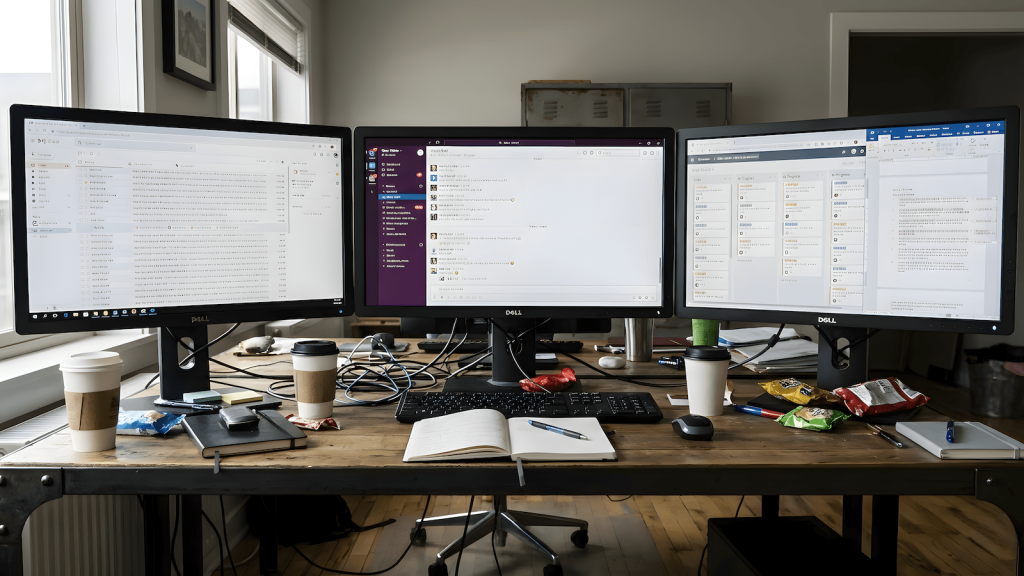
The multi-monitor productivity trap is a setup that looks productive. More screen space, more windows, less friction. Everything visible, everything ready. On paper, that logic makes sense. In real remote work, it often collapses. People with two or three monitors work longer hours, respond faster, and stay constantly “on,” yet output thins out, tasks stall, and days end without a clear sense of completion. The issue isn’t the monitors themselves. It’s what they allow to coexist at the same time.
Visibility Creates Pressure
Every screen becomes a demand surface. Email on one monitor, chat on another, a document open but inactive, a task board half-updated, a dashboard refreshing in the corner, a browser tab that isn’t needed yet but keeps pulling attention anyway. None of these are urgent on their own, but together they create constant low-grade pressure. You don’t switch tasks because you consciously decided to. You switch because something is already visible and asking to be acknowledged. That’s how context switching stops being intentional and becomes environmental.
I already pointed out the gap between activity and output in remote work. Multiple screens don’t close that gap. They widen it by increasing exposure.
The Exposure Problem No One Talks About
Most productivity advice treats distraction as an event. A notification pops up. Someone messages you. Something interrupts your flow. But in many home offices, nothing interrupts you. Everything is simply present. Unfinished work never leaves your view. Future work sits beside current work. Other people’s priorities share the same visual space as your own. Even tasks meant for later remain mentally active because they’re still visible. That constant exposure prevents closure.
Tasks don’t end; they fade. Anything that fades without closing continues to tax attention. This is why people feel drained without being able to name a single hard task. The fatigue doesn’t come from difficulty. It comes from carrying too many open contexts at once.
When Multiple Monitors Actually Work (and When They Don’t)
Multiple monitors are not inherently bad. They work when:
- Tasks share the same mental frame
- One screen clearly supports another
- Context stays stable for long stretches
- Non-relevant work is genuinely hidden
Designers, editors, analysts, and developers often benefit when one display feeds the other and nothing else competes for attention.
They fail when:
- Each screen represents a different role
- Messaging, planning, execution, and monitoring live side by side
- Work requires frequent mode changes
- Nothing ever fully closes
At that point, the setup stops supporting work and starts fragmenting it. The desk looks efficient. The day feels scattered.
The Control Room Illusion
A real control room works because roles are fixed. One screen does one job. Signals are filtered. Alerts mean something specific. Operators aren’t expected to act on everything at once. Most home offices copy the appearance without the structure. Everything stays visible. Nothing is truly off. The brain keeps re-orienting even when hands never leave the keyboard. That’s not multitasking. That’s exposure overload.
This framing is already core to how RemoteWorkHaven approaches workspace design: Your home office is a control room.
Why This Feels Like a Personal Failure
People blame themselves because they’re still “working.” Messages get answered. Tasks inch forward. Hours disappear. What’s missing is momentum. That loss isn’t about discipline or focus. It comes from repeatedly tearing down and rebuilding mental context, the underlying failure explained and why context switching kills your momentum.
The environment doesn’t feel hostile. It feels normal. That’s why the drain goes unnoticed until results flatten.
Burnout Without Drama
This is how burnout accumulates quietly in remote work. Not through dramatic overload, but through constant low-grade cognitive pressure. Nothing ever fully shuts off. Nothing ever fully finishes. The workday becomes a continuous partial-attention state. RemoteWorkHaven has already documented how this pattern turns into long-term fatigue and disengagement: In the remote work burnout trap.
What to Ignore
Ignore setup flex culture. Ignore claims that more screens automatically mean more productivity. Ignore advice that treats workspace design as personal preference instead of operational load. Ignore gear-first solutions that add complexity without reducing exposure. None of that explains why effort stays high while progress disappears.
The Real Constraint
A productive setup isn’t about how much you can see. It’s about how little you’re forced to acknowledge at once. When multiple task worlds remain visible simultaneously, context switching becomes ambient. It happens without conscious intent. Ambient pressure is the hardest kind to notice. You only feel it once momentum is gone.
RemoteWorkHaven exists to treat environment as cause, not decoration. If your setup looks impressive but your output feels thin, don’t optimize harder. Question what your workspace keeps asking your brain to hold open.

WFH Survival Architect • Licensed Procrastination Consultant
Writes about why remote work breaks down in practice even when the setup looks “correct.” Focused on environment-level failure points—visibility overload, boundary collapse, and systems that quietly drain momentum while everyone blames discipline. Built RemoteWorkHaven.net for people who don’t need another productivity trick, but need their workspace to stop sabotaging them during an ordinary workday.